<?xml version="1.0" encoding="utf-8"?><feed xmlns="http://www.w3.org/2005/Atom" ><generator uri="https://jekyllrb.com/" version="3.9.5">Jekyll</generator><link href="https://tim.cogan.dev/feed.xml" rel="self" type="application/atom+xml" /><link href="https://tim.cogan.dev/" rel="alternate" type="text/html" /><updated>2026-08-12T17:26:09+00:00</updated><id>https://tim.cogan.dev/feed.xml</id><title type="html">Tim Cogan</title><subtitle>Tim Cogan is a software engineer, data scientist, AI researcher, and author working on medical imaging, open-source software, and STEM books for kids.</subtitle><author><name>Tim Cogan</name></author><entry><title type="html">From Garmin to Google: Google Fitbit Air Review After One Week</title><link href="https://tim.cogan.dev/google-air-review/" rel="alternate" type="text/html" title="From Garmin to Google: Google Fitbit Air Review After One Week" /><published>2026-08-12T00:00:00+00:00</published><updated>2026-08-12T00:00:00+00:00</updated><id>https://tim.cogan.dev/google-air-review</id><content type="html" xml:base="https://tim.cogan.dev/google-air-review/"><![CDATA[<p>For the past 4+ years, I’ve been wearing a Garmin vivosmart 5 to track steps, heart rate, SpO2, etc.
In many respects, this device has done everything I’ve needed it to do, and it has held up well
through many runs, hikes, and other adventures. However, after years of wear and tear, it started
showing its age with symptoms such as dead pixels and charging difficulty.</p>

<p>A couple of weeks ago, I was hiking the <a href="https://en.wikipedia.org/wiki/Mount_Democrat#DeCaLiBron_Loop]">DeCaLiBron loop</a>,
and I noticed afterwards that none of my heart rate data was tracked! The green heart rate monitoring
LEDs wouldn’t even turn on until I reset the watch. I don’t totally fault Garmin for this — like I mentioned,
it is an old device. Nevertheless, I decided it was time I found a replacement.</p>

<p>My go-to replacement for this tracker would be a vivosmart 6… if such a device existed. For some reason,
Garmin (as of Aug. 12, 2026) has not released or announced a successor to the vivosmart 5.
Anyways, the point of this discussion is that without an obvious replacement for my existing
watch, I needed to do some market research to discover my options.</p>

<p>Choosing a fitness tracker can be a bit overwhelming due to the number of options:
full-size smart watches (e.g., Apple Watch, Pixel Watch, Garmin fenix, etc.),
fitness trackers with screens (vivosmart 5, Fitbit Charge 6, etc.),
and trackers without screens (WHOOP, Fitbit Air, etc.). Years back, when I bought my
vivosmart 5, the idea of going screenless seemed very unappealing. However, I’ve learned to
love &amp; hate the vivosmart’s screen.
For all of the convenience that screens offer,
running water can inadvertently manipulate the touch screen and trigger unwanted behavior,
notifications can be intrusive at inconvenient times (I know, I know, I should just remember to turn on “Do Not Disturb”),
you have to worry about the screen getting damaged, and the display adds to the overall cost/weight/size
of the product.</p>

<p>So, after experiencing all of the pros/cons of a display, I was open to the idea of a screenless tracker.
I looked through several options, but the two that appealed most were the Fitbit Air and Garmin CIRQA.
The CIRQA appealed to me as it would allow me to stay within
the Garmin ecosystem, but without any compelling feature differences over the Fitbit Air
(at least for my personal use-case),
the 2x price tag was difficult to justify. And so I ordered a Fitbit Air.
(Side note: although Garmins and Fitbits are similar in many ways, the corresponding ecosystems
place different emphases on health, wellness, and athletics. Depending on your personal motivations
for wearing such a device, one may appeal much more strongly than the other.)</p>

<figure style="max-width: 360px; margin: 1.5rem auto;">
  <img src="../images/google-fitbit-air-review.jpg" alt="Google Fitbit Air screenless fitness tracker with an obsidian band outdoors" style="display: block; width: 100%; height: auto;" loading="lazy" />
</figure>

<p>After a week of daily use, I have no complaints or regrets.
(Well, actually I have one minor complaint if you skip to the end.)
I almost miss being able to check the time on my wrist,
but I switched my phone to screen-always-on-mode (“screen-on” except when the proximity sensor is covered),
and I simply leverage my phone more.
The screen of the vivosmart is tap-to-wake, so checking the time was never “instantaneous”, anyways.
There are <a href="https://www.printables.com/model/1747694-fitbit-air-adapter-for-bicep-straps-or-nato-bands">printable adapters</a>
for attaching the Air pebble to a regular wrist watch, but for now I’m enjoying the OEM strap.
Google has actually facilitated the design of these custom adapters by releasing
<a href="https://store.google.com/us/magazine/google-fitbit-air-custom-bands">CAD drawings and design guidelines</a>.
Kudos to Google!</p>

<p>Although I haven’t done a detailed analysis of the Air’s accuracy (step count, heart rate, etc.), the numbers I
get are very similar to what I was used to seeing on my vivosmart.
And I know this is very anecdotal / unscientific of me, but there are
plenty of quantitative assessments available online for those who are interested (maybe I’ll do my own “study” in the future…).</p>

<p>All of the above being said, here is what I like the most: the Air is extremely comfortable and lightweight.
The Air is like… well, air!
Of every wrist-device I’ve worn, it is by far the easiest to put on and forget about.
It does everything I want it to do, it looks nice, and it feels great. What more can you ask for?
Additionally, I have a mild nickel-allergy that prevents me from wearing many wrist-based products.
I was a bit worried about the stainless steel component on the Air’s strap, but so far I haven’t had any issues with it.
The black finish on my obsidian-style band may provide an effective skin/metal barrier,
and it helps that the stainless steel loop doesn’t directly contact skin (at least for how I wear the strap).
Though the two charging contacts may also contain nickel (I couldn’t confirm this), they don’t contact skin either.</p>

<p>One final aspect I’ve really enjoyed is using the Google Health Android app. The Garmin app is not bad, but it doesn’t
come with a widget or as much customizability. I do wish the Google Health widget or the Google battery widget
would let me see the Air’s battery % (as is the case with the Pixel Buds, from what I’ve seen).
As of now, this has been my only true complaint, and I’m hoping 
this is addressed in a future software update.</p>

<p>Anyways, if you’re considering the Air, I hope I’ve given you something
helpful to think about. And whether you get a Garmin, Fitbit, or Apple, the most important thing
is to stay active and healthy. :)</p>]]></content><author><name>Tim Cogan</name></author><summary type="html"><![CDATA[A one-week Google Fitbit Air review from a longtime Garmin vivosmart 5 user, covering comfort, activity tracking, accessories, and Google Health.]]></summary><media:thumbnail xmlns:media="http://search.yahoo.com/mrss/" url="https://tim.cogan.dev/images/google-fitbit-air-review.jpg" /><media:content medium="image" url="https://tim.cogan.dev/images/google-fitbit-air-review.jpg" xmlns:media="http://search.yahoo.com/mrss/" /></entry><entry><title type="html">Perspecta: A Minimalist Medical Image Viewer</title><link href="https://tim.cogan.dev/perspecta/" rel="alternate" type="text/html" title="Perspecta: A Minimalist Medical Image Viewer" /><published>2026-03-25T00:00:00+00:00</published><updated>2026-03-25T00:00:00+00:00</updated><id>https://tim.cogan.dev/perspecta</id><content type="html" xml:base="https://tim.cogan.dev/perspecta/"><![CDATA[<p>Recently, I’ve been working on <em>Perspecta</em>, a minimalist desktop DICOM viewer written in Rust.</p>

<p>When working with DICOM images, I often just need something fast and lightweight: a way to quickly open a specific image (or a small group of images) and move on.
I also don’t want extra UI elements taking up screen space.
That’s why I built Perspecta.</p>

<p>Perspecta is open-source and MIT-licensed. If you’d like to try it or contribute, you can find the <a href="https://github.com/timcogan/perspecta">GitHub repository</a>.</p>

<p>Feedback is welcome!</p>]]></content><author><name>Tim Cogan</name></author><summary type="html"><![CDATA[Recently, I’ve been working on Perspecta, a minimalist desktop DICOM viewer written in Rust.]]></summary><media:thumbnail xmlns:media="http://search.yahoo.com/mrss/" url="https://tim.cogan.dev/images/perspecta-light.svg" /><media:content medium="image" url="https://tim.cogan.dev/images/perspecta-light.svg" xmlns:media="http://search.yahoo.com/mrss/" /></entry><entry><title type="html">ChatGPT for 3D Printing Fishing Tackle</title><link href="https://tim.cogan.dev/sinker-bumper/" rel="alternate" type="text/html" title="ChatGPT for 3D Printing Fishing Tackle" /><published>2024-02-15T00:00:00+00:00</published><updated>2024-02-15T00:00:00+00:00</updated><id>https://tim.cogan.dev/sinker-bumper</id><content type="html" xml:base="https://tim.cogan.dev/sinker-bumper/"><![CDATA[<p>One of my hobbies is fishing, and it just so happens
that Texas, where I live, is one of the
<a href="https://www.forbes.com/sites/lealane/2022/10/06/the-reel-deal-best-and-worst-states-for-fishing-in-the-us/?sh=73d80e9061e1">best states for fishing</a>.</p>

<p>When I’m not fishing with a lure, I like to use a
tungsten slip sinker, which is nice for a couple of reasons:</p>
<ol>
  <li>Traditional lead sinkers are potentially bad for the environment
and <a href="https://en.wikipedia.org/wiki/Lead_poisoning">bad for you</a>.</li>
  <li>Tungsten has a higher density than lead
 (<a href="https://en.wikipedia.org/wiki/Tungsten"><span class="katex"><span class="katex-mathml"><math xmlns="http://www.w3.org/1998/Math/MathML"><semantics><mrow><mn>19.3</mn><mi>g</mi><mi mathvariant="normal">/</mi><mi>c</mi><msup><mi>m</mi><mn>3</mn></msup></mrow><annotation encoding="application/x-tex">19.3 g/cm^{3}</annotation></semantics></math></span><span class="katex-html" aria-hidden="true"><span class="base"><span class="strut" style="height:1.0641em;vertical-align:-0.25em;"></span><span class="mord">19.3</span><span class="mord mathnormal" style="margin-right:0.0359em;">g</span><span class="mord">/</span><span class="mord mathnormal">c</span><span class="mord"><span class="mord mathnormal">m</span><span class="msupsub"><span class="vlist-t"><span class="vlist-r"><span class="vlist" style="height:0.8141em;"><span style="top:-3.063em;margin-right:0.05em;"><span class="pstrut" style="height:2.7em;"></span><span class="sizing reset-size6 size3 mtight"><span class="mord mtight"><span class="mord mtight">3</span></span></span></span></span></span></span></span></span></span></span></span></a>
 versus
 <a href="https://en.wikipedia.org/wiki/Lead"><span class="katex"><span class="katex-mathml"><math xmlns="http://www.w3.org/1998/Math/MathML"><semantics><mrow><mn>11.3</mn><mi>g</mi><mi mathvariant="normal">/</mi><mi>c</mi><msup><mi>m</mi><mn>3</mn></msup></mrow><annotation encoding="application/x-tex">11.3 g/cm^{3}</annotation></semantics></math></span><span class="katex-html" aria-hidden="true"><span class="base"><span class="strut" style="height:1.0641em;vertical-align:-0.25em;"></span><span class="mord">11.3</span><span class="mord mathnormal" style="margin-right:0.0359em;">g</span><span class="mord">/</span><span class="mord mathnormal">c</span><span class="mord"><span class="mord mathnormal">m</span><span class="msupsub"><span class="vlist-t"><span class="vlist-r"><span class="vlist" style="height:0.8141em;"><span style="top:-3.063em;margin-right:0.05em;"><span class="pstrut" style="height:2.7em;"></span><span class="sizing reset-size6 size3 mtight"><span class="mord mtight"><span class="mord mtight">3</span></span></span></span></span></span></span></span></span></span></span></span></a>),
 arguably making it better sinker material.
The primary disadvantage is that tungsten is more expensive than lead
(something like <a href="https://buildingspeed.org/2020/07/02/ballast-tungsten-vs-lead/">~18x the cost</a>).
Thankfully, you don’t need much tungsten to make a good sinker. In my case, I generally use
sinkers that weigh under 1 ounce.</li>
</ol>

<p>Anyways, there’s a component known as a sinker bumper (AKA a ‘shock spacer’ or ‘knot protector’)
which sits in between your slide
sinker and any knot on your line. The bumper protects your knot from the sinker as
it moves along the line. Since the bumper is a simple plastic bead, I thought it’d be a
perfect application for my 3D printer.</p>

<p>However, simple searches on
<a href="https://www.thingiverse.com">Thingiverse</a>
and
<a href="https://www.printables.com">Printables</a>
turned up nothing.
I’m sure I could have found something (after all, the bumper is just a plastic bead),
but I thought I’d design one myself, just for fun.
And to make things more interesting, I thought I’d use ChatGPT to create the design.</p>

<p>So my prompt to ChatGPT was:</p>
<div class="language-plaintext highlighter-rouge"><div class="highlight"><pre class="highlight"><code>Write me an OpenSCAD script to generate a sinker bumper.
</code></pre></div></div>

<p>For which ChatGPT provided this script:</p>
<div class="language-c highlighter-rouge"><div class="highlight"><pre class="highlight"><code><span class="c1">// Sinker Bumper Parameters</span>
<span class="err">$</span><span class="n">fn</span> <span class="o">=</span> <span class="mi">100</span><span class="p">;</span> <span class="c1">// Increase for smoother circles</span>
<span class="n">outer_diameter</span> <span class="o">=</span> <span class="mi">10</span><span class="p">;</span> <span class="c1">// Outer diameter of the bumper in mm</span>
<span class="n">inner_diameter</span> <span class="o">=</span> <span class="mi">5</span><span class="p">;</span>  <span class="c1">// Inner diameter of the hole in mm</span>
<span class="n">height</span> <span class="o">=</span> <span class="mi">5</span><span class="p">;</span>          <span class="c1">// Height of the bumper in mm</span>

<span class="c1">// Sinker Bumper Model</span>
<span class="n">difference</span><span class="p">()</span> <span class="p">{</span>
    <span class="n">cylinder</span><span class="p">(</span><span class="n">h</span> <span class="o">=</span> <span class="n">height</span><span class="p">,</span> <span class="n">r</span> <span class="o">=</span> <span class="n">outer_diameter</span> <span class="o">/</span> <span class="mi">2</span><span class="p">,</span> <span class="n">center</span> <span class="o">=</span> <span class="nb">true</span><span class="p">);</span>
    <span class="n">cylinder</span><span class="p">(</span><span class="n">h</span> <span class="o">=</span> <span class="n">height</span> <span class="o">+</span> <span class="mi">2</span><span class="p">,</span> <span class="n">r</span> <span class="o">=</span> <span class="n">inner_diameter</span> <span class="o">/</span> <span class="mi">2</span><span class="p">,</span> <span class="n">center</span> <span class="o">=</span> <span class="nb">true</span><span class="p">);</span>
<span class="p">}</span>

<span class="c1">// Render the Model</span>
<span class="n">translate</span><span class="p">([</span><span class="mi">0</span><span class="p">,</span> <span class="mi">0</span><span class="p">,</span> <span class="mi">0</span><span class="p">])</span>
<span class="n">difference</span><span class="p">();</span>
</code></pre></div></div>

<p>Not bad!</p>

<p>Though I only specified ‘sinker bumper’, ChatGPT generated 
something with the correct shape and approximately correct dimensions.</p>

<p>The inner diameter is most problematic: 5 millimeters is too big.
Instead, I used an outer diameter of 5 millimeters and an
inner diameter of 2 millimeters.</p>

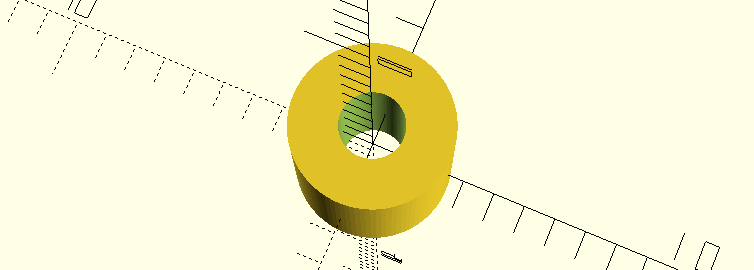
<p>After pasting the script into
<a href="https://openscad.org/">OpenSCAD</a>,
here’s what the design looked like:
<img src="/images/sinker-bumper.png#rounded" alt="OpenSCAD sinker bumper model" /></p>

<p>So, I exported the model as an
<a href="https://en.wikipedia.org/wiki/STL_(file_format)"><code class="language-plaintext highlighter-rouge">STL</code></a>
file, converted it into
<a href="https://en.wikipedia.org/wiki/G-code"><code class="language-plaintext highlighter-rouge">G-code</code></a>
using
<a href="https://ultimaker.com/software/ultimaker-cura/">Cura</a>, and kicked
off the print using my
<a href="https://www.creality.com/products/ender-3-neo-3d-printer">Ender-3 Neo</a>.</p>

<p>And here’s how the bumper looks in between a swivel and a sinker:
<img src="/images/sinker-bumper-picture.png#rounded" alt="Printed sinker bumper between a swivel and a sinker" /></p>

<p>Though I used
<a href="https://en.wikipedia.org/wiki/Polylactic_acid">PLA</a>
for this print,
<a href="https://en.wikipedia.org/wiki/Thermoplastic_polyurethane">TPU</a>
is more elastic and would provide better cushioning.
Also, I used 100% fill, so the bumper should sink by itself.
But the bumper (or any PLA object) should start to float at around ~80% fill.</p>

<p>If you’re interested, you can download the STL file
<a href="https://www.printables.com/model/765399-sinker-bumper">here</a>.</p>]]></content><author><name>Tim Cogan</name></author><summary type="html"><![CDATA[One of my hobbies is fishing, and it just so happens that Texas, where I live, is one of the best states for fishing.]]></summary><media:thumbnail xmlns:media="http://search.yahoo.com/mrss/" url="https://tim.cogan.dev/images/sinker-bumper.png" /><media:content medium="image" url="https://tim.cogan.dev/images/sinker-bumper.png" xmlns:media="http://search.yahoo.com/mrss/" /></entry><entry><title type="html">Private AI</title><link href="https://tim.cogan.dev/private-ai/" rel="alternate" type="text/html" title="Private AI" /><published>2023-03-29T00:00:00+00:00</published><updated>2023-03-29T00:00:00+00:00</updated><id>https://tim.cogan.dev/private-ai</id><content type="html" xml:base="https://tim.cogan.dev/private-ai/"><![CDATA[<p>Earlier this month, my dad sent me a resource for self-hosting a ChatGPT-like AI.</p>

<p>And this led to a conversation that sparked an idea:</p>

<p>Set up a private chat AI, reachable via Signal messaging.</p>

<p>A few Bash &amp; Python scripts later, our system was up and running.</p>

<p>And we’ve been having a lot of fun with it.</p>

<p>I think others will also enjoy this, so I’m sharing a public repository for the Private AI Project.</p>

<p>Reasons to self-host a chat AI:</p>

<p>• Keep your chat history 100% private.</p>

<p>• Message your AI with end-to-end encryption.</p>

<p>• Stop paying for monthly subscriptions.</p>

<p>Contributors welcome!</p>

<p>See the project <a href="https://github.com/timcogan/private-ai">here</a>.</p>]]></content><author><name>Tim Cogan</name></author><summary type="html"><![CDATA[Earlier this month, my dad sent me a resource for self-hosting a ChatGPT-like AI.]]></summary><media:thumbnail xmlns:media="http://search.yahoo.com/mrss/" url="https://tim.cogan.dev/images/private-ai.svg" /><media:content medium="image" url="https://tim.cogan.dev/images/private-ai.svg" xmlns:media="http://search.yahoo.com/mrss/" /></entry><entry><title type="html">FDA Clearance</title><link href="https://tim.cogan.dev/fda/" rel="alternate" type="text/html" title="FDA Clearance" /><published>2022-12-15T00:00:00+00:00</published><updated>2022-12-15T00:00:00+00:00</updated><id>https://tim.cogan.dev/fda</id><content type="html" xml:base="https://tim.cogan.dev/fda/"><![CDATA[<p>A little over five years ago, my advisor, Dr. Lakshman Tamil, and I began developing an AI for early breast cancer detection.</p>

<p>I don’t think I can adequately cover the last 5+ years in this short post, but I will say that it has been quite an adventure.</p>

<p>It’s been a road with many challenges yet also many successes.</p>

<p>A pivotal milestone was the creation of MedCognetics, bringing together a team passionate about transforming healthcare and women’s health.</p>

<p>And today, I’m pleased to share this team’s latest milestone of FDA clearance for our breast cancer screening service.</p>

<p>I also want to recognize those who made this milestone possible: not only the fantastic team at MedCognetics, but also some incredible individuals at UTDallas, our partners at UTSW, and many others.</p>

<p>It’s been an absolute honor to work alongside and build relationships with these people.</p>

<p>Thank you, everyone. I look forward to what we can accomplish in the next five years.</p>]]></content><author><name>Tim Cogan</name></author><summary type="html"><![CDATA[A little over five years ago, my advisor, Dr. Lakshman Tamil, and I began developing an AI for early breast cancer detection.]]></summary><media:thumbnail xmlns:media="http://search.yahoo.com/mrss/" url="https://tim.cogan.dev/images/medcognetics-logo.svg" /><media:content medium="image" url="https://tim.cogan.dev/images/medcognetics-logo.svg" xmlns:media="http://search.yahoo.com/mrss/" /></entry><entry><title type="html">My First Trip to India</title><link href="https://tim.cogan.dev/india/" rel="alternate" type="text/html" title="My First Trip to India" /><published>2022-11-21T00:00:00+00:00</published><updated>2022-11-21T00:00:00+00:00</updated><id>https://tim.cogan.dev/india</id><content type="html" xml:base="https://tim.cogan.dev/india/"><![CDATA[<p>By way of my career, I’ve had the immense pleasure of traveling to many parts of the world. And earlier this month, I had the opportunity to visit India for the first time.</p>

<p>The food I ate and the places I saw were unforgettable. Pictures do no justice, particularly for the Taj Mahal.</p>

<p>Visiting the Taj Mahal is the experience of observing, approaching, and finally stepping into a painting. To explore it means to feel as though you’ve entered into another’s imagination.</p>

<p>However, my favorite part wasn’t experiencing the food and the places.</p>

<p>The best part was the people.</p>

<p>The absolute highlights of my trip are the incredible hospitality, sharing of stories, and laughing with others.</p>

<p>Seeing the world is fantastic. But my favorite thing about traveling is the reminder that no matter where you find yourself on Earth, you’ll find people, just like you and me, running this race called life. We have so much in common, despite our differences.</p>

<p>Thank you, India. I look forward to returning someday.</p>

<p><img src="/images/taj-mahal.png#rounded" alt="Tim at the Taj Mahal" /></p>]]></content><author><name>Tim Cogan</name></author><summary type="html"><![CDATA[By way of my career, I’ve had the immense pleasure of traveling to many parts of the world. And earlier this month, I had the opportunity to visit India for the first time.]]></summary><media:thumbnail xmlns:media="http://search.yahoo.com/mrss/" url="https://tim.cogan.dev/images/taj-mahal.png" /><media:content medium="image" url="https://tim.cogan.dev/images/taj-mahal.png" xmlns:media="http://search.yahoo.com/mrss/" /></entry><entry><title type="html">Data Science for Babies, 2nd edition</title><link href="https://tim.cogan.dev/data-science-for-babies-2nd/" rel="alternate" type="text/html" title="Data Science for Babies, 2nd edition" /><published>2022-09-21T00:00:00+00:00</published><updated>2022-09-21T00:00:00+00:00</updated><id>https://tim.cogan.dev/data-science-for-babies-2nd</id><content type="html" xml:base="https://tim.cogan.dev/data-science-for-babies-2nd/"><![CDATA[<p>I’m happy to announce the release of <em>Data Science for Babies, 2nd edition</em>, and I’d like to thank everyone who has provided feedback, suggestions, and critiques across all of my books.</p>

<p><a href="https://www.youtube.com/shorts/Lfkr9dT4SwE">Here’s a link</a> to a book trailer which was straightforward to create. Since my books are compiled with a Python-based framework, changing the compilation process to produce a video file instead of a book PDF was just a few dozen lines of code.</p>

<p>If you’re interesting in getting a copy of the book, please check out the listing <a href="https://www.amazon.com/dp/B0BF2L7LBL">here</a>.</p>

<p>Also, if you’ve enjoyed <em>Data Science for Babies</em>, please consider leaving a positive review on Amazon and letting others know what you think!</p>]]></content><author><name>Tim Cogan</name></author><summary type="html"><![CDATA[I’m happy to announce the release of Data Science for Babies, 2nd edition, and I’d like to thank everyone who has provided feedback, suggestions, and critiques across all of my books.]]></summary><media:thumbnail xmlns:media="http://search.yahoo.com/mrss/" url="https://tim.cogan.dev/images/data-science-2nd.png" /><media:content medium="image" url="https://tim.cogan.dev/images/data-science-2nd.png" xmlns:media="http://search.yahoo.com/mrss/" /></entry><entry><title type="html">Entrepreneurship for Young Minds</title><link href="https://tim.cogan.dev/entr-young-minds/" rel="alternate" type="text/html" title="Entrepreneurship for Young Minds" /><published>2022-07-23T00:00:00+00:00</published><updated>2022-07-23T00:00:00+00:00</updated><id>https://tim.cogan.dev/entr-young-minds</id><content type="html" xml:base="https://tim.cogan.dev/entr-young-minds/"><![CDATA[<p>My son, Silas, has started asking a recurring question.</p>

<p>Some mornings around 7am, Silas stumbles into my office, still half asleep, and asks,</p>

<p><em>“Dad, did you write another cookie book?”</em></p>

<p>A moment passes as I finish typing out a line of code, and I usually answer something like,</p>

<p><em>“No, Buddy, not today.”</em></p>

<p>However, recently I was able to say, <em>“Yup, a draft is ready! Can you read it and make suggestions?”</em> and then see a smile pop onto his face.</p>

<p>A few revisions later, following lots of good feedback from Silas and Maribeth, I’m happy to release <em>“Entrepreneurship for Young Minds”</em>, a book about entrepreneurship for young kids, as the name suggests.</p>

<p>Although it’s hard to capture all aspects of entrepreneurship in a small number of pages, I’ve drawn from a few themes which I think are important:</p>

<ul>
  <li>Looking for solutions to problems</li>
  <li>Persevering in the midst of failure</li>
  <li>Avoiding complacency</li>
  <li>Dreaming big</li>
</ul>

<p>As with my previous books, I’ve written the story to be both educational and fun, and I hope it will inspire future entrepreneurs and young minds who will grow up to change the world.</p>

<p>Please check it out <a href="https://www.amazon.com/Entrepreneurship-for-Young-Minds/dp/B0B6L993GH">here</a>, and feel free to let me know your thoughts if you do.</p>]]></content><author><name>Tim Cogan</name></author><summary type="html"><![CDATA[My son, Silas, has started asking a recurring question.]]></summary><media:thumbnail xmlns:media="http://search.yahoo.com/mrss/" url="https://tim.cogan.dev/images/entr-young-minds.png" /><media:content medium="image" url="https://tim.cogan.dev/images/entr-young-minds.png" xmlns:media="http://search.yahoo.com/mrss/" /></entry><entry><title type="html">LZSS in Python</title><link href="https://tim.cogan.dev/lzss/" rel="alternate" type="text/html" title="LZSS in Python" /><published>2022-05-21T00:00:00+00:00</published><updated>2022-05-21T00:00:00+00:00</updated><id>https://tim.cogan.dev/lzss</id><content type="html" xml:base="https://tim.cogan.dev/lzss/"><![CDATA[<p>This post walks through a simple LZSS compression implementation, written in Python.</p>

<h2 id="background">Background</h2>

<p>The LZSS code I’m presenting here is based on this
<a href="https://github.com/manassra/LZ77-Compressor">GitHub project</a>,
but I’ve created <a href="https://github.com/timcogan/lzss">my own fork</a>
with some improvements and optimizations.</p>

<p>For some background on LZSS, <a href="https://en.wikipedia.org/wiki/Lempel-Ziv-Storer-Szymanski">Wikipedia</a>
has a pretty good description.</p>

<p>The remainder of this post will walk through an implementation of
compression followed by decompression.</p>

<h2 id="compression">Compression</h2>

<h3 id="overview">Overview</h3>

<p>The main function for compression is fairly short:</p>

<div class="language-python highlighter-rouge"><div class="highlight"><pre class="highlight"><code><span class="k">def</span> <span class="nf">compress</span><span class="p">(</span><span class="n">data</span><span class="p">:</span> <span class="nb">bytes</span><span class="p">)</span> <span class="o">-&gt;</span> <span class="nb">bytes</span><span class="p">:</span>
    <span class="n">output_buffer</span> <span class="o">=</span> <span class="n">bitarray</span><span class="p">(</span><span class="n">endian</span><span class="o">=</span><span class="s">"big"</span><span class="p">)</span>
    <span class="n">output_buffer</span><span class="p">.</span><span class="n">fromlist</span> <span class="o">=</span> <span class="k">lambda</span> <span class="n">x</span><span class="p">:</span> <span class="n">output_buffer</span><span class="p">.</span><span class="n">frombytes</span><span class="p">(</span><span class="nb">bytes</span><span class="p">(</span><span class="n">x</span><span class="p">))</span>

    <span class="n">i</span> <span class="o">=</span> <span class="mi">0</span>
    <span class="k">while</span> <span class="n">i</span> <span class="o">&lt;</span> <span class="nb">len</span><span class="p">(</span><span class="n">data</span><span class="p">):</span>
        <span class="k">if</span> <span class="n">match</span> <span class="p">:</span><span class="o">=</span> <span class="n">find_longest_match</span><span class="p">(</span><span class="n">data</span><span class="p">,</span> <span class="n">i</span><span class="p">):</span>
            <span class="n">match_distance</span><span class="p">,</span> <span class="n">match_length</span> <span class="o">=</span> <span class="n">match</span>
            <span class="n">output_buffer</span><span class="p">.</span><span class="n">append</span><span class="p">(</span><span class="n">IS_MATCH_BIT</span><span class="p">)</span>
            <span class="n">dist_hi</span><span class="p">,</span> <span class="n">dist_lo</span> <span class="o">=</span> <span class="n">match_distance</span> <span class="o">&gt;&gt;</span> <span class="mi">4</span><span class="p">,</span> <span class="p">(</span><span class="n">match_distance</span><span class="p">)</span> <span class="o">&amp;</span> <span class="mh">0xF</span>
            <span class="n">output_buffer</span><span class="p">.</span><span class="n">fromlist</span><span class="p">([</span><span class="n">dist_hi</span><span class="p">,</span> <span class="p">(</span><span class="n">dist_lo</span> <span class="o">&lt;&lt;</span> <span class="mi">4</span><span class="p">)</span> <span class="o">|</span> <span class="p">(</span><span class="n">match_length</span> <span class="o">-</span> <span class="n">LENGTH_OFFSET</span><span class="p">)])</span>
            <span class="n">i</span> <span class="o">+=</span> <span class="n">match_length</span>
        <span class="k">else</span><span class="p">:</span>
            <span class="n">output_buffer</span><span class="p">.</span><span class="n">append</span><span class="p">(</span><span class="ow">not</span> <span class="n">IS_MATCH_BIT</span><span class="p">)</span>
            <span class="n">output_buffer</span><span class="p">.</span><span class="n">fromlist</span><span class="p">([</span><span class="n">data</span><span class="p">[</span><span class="n">i</span><span class="p">]])</span>
            <span class="n">i</span> <span class="o">+=</span> <span class="mi">1</span>

    <span class="n">output_buffer</span><span class="p">.</span><span class="n">fill</span><span class="p">()</span>  <span class="c1"># Pad to complete last byte
</span>    <span class="k">return</span> <span class="n">output_buffer</span><span class="p">.</span><span class="n">tobytes</span><span class="p">()</span>
</code></pre></div></div>

<p>This function takes in a <code class="language-python highlight highlighter-rouge"><span class="nb">bytes</span></code> object
of uncompressed bytes
and returns a
<code class="language-python highlight highlighter-rouge"><span class="nb">bytes</span></code> object of compressed bytes.
To understand how this code works, we’ll walk through a few compression examples.</p>

<h3 id="example-1">Example 1</h3>

<p>For our first compression example, we’ll compress the
<code class="language-python highlight highlighter-rouge"><span class="nb">bytes</span></code> object
<code class="language-python highlight highlighter-rouge"><span class="sa">b</span><span class="s">"zzzzz"</span></code>.</p>

<p>On the first iteration of our loop <code class="language-python highlight highlighter-rouge"><span class="k">while</span> <span class="n">i</span> <span class="o">&lt;</span> <span class="nb">len</span><span class="p">(</span><span class="n">data</span><span class="p">):</span></code>,
<code class="language-python highlight highlighter-rouge"><span class="n">find_longest_match</span><span class="p">(</span><span class="n">data</span><span class="p">,</span> <span class="n">i</span><span class="p">)</span></code> will return
<code class="language-python highlight highlighter-rouge"><span class="bp">None</span></code> because we’re looking at the first byte in our raw
data and there are no previous bytes to match against. We’ll walk through
<code class="language-python highlight highlighter-rouge"><span class="n">find_longest_match</span></code> in more detail later.
So, we append a single bit, <code class="language-python highlight highlighter-rouge"><span class="mi">0</span></code>,
followed by the byte <code class="language-python highlight highlighter-rouge"><span class="sa">b</span><span class="s">"z"</span></code>
(<code class="language-python highlight highlighter-rouge"><span class="n">IS_MATCH_BIT</span></code> is a
<code class="language-python highlight highlighter-rouge"><span class="nb">bool</span></code>
set to <code class="language-python highlight highlighter-rouge"><span class="bp">True</span></code>).</p>

<p>On the second loop iteration, things are a bit more interesting. Since our next 4 bytes
<code class="language-python highlight highlighter-rouge"><span class="sa">b</span><span class="s">"zzzz"</span></code> share a common value with our first byte
<code class="language-python highlight highlighter-rouge"><span class="sa">b</span><span class="s">"z"</span></code>,
<code class="language-python highlight highlighter-rouge"><span class="n">find_longest_match</span></code> will return a
non-<code class="language-python highlight highlighter-rouge"><span class="bp">None</span></code> <code class="language-python highlight highlighter-rouge"><span class="n">Tuple</span></code>
containing a <code class="language-python highlight highlighter-rouge"><span class="n">match_distance</span></code> equal to 1
and <code class="language-python highlight highlighter-rouge"><span class="n">match_length</span></code> equal to 4.</p>

<p>Let’s discuss what these values mean.
<code class="language-python highlight highlighter-rouge"><span class="n">match_distance</span></code> equal to 1 means that we found a match which
is just one previous position away from our current position.
<code class="language-python highlight highlighter-rouge"><span class="n">match_length</span></code> equal to 4 means that we matched 4 bytes. In this
case, it means that our match of <code class="language-python highlight highlighter-rouge"><span class="sa">b</span><span class="s">"z"</span></code> is repeated 4 times.</p>

<p>Since we successfully found a match, we append a single bit value of 1,
<code class="language-python highlight highlighter-rouge"><span class="n">IS_MATCH_BIT</span></code>, followed by values for
<code class="language-python highlight highlighter-rouge"><span class="n">match_distance</span></code> and
<code class="language-python highlight highlighter-rouge"><span class="n">match_length</span></code> packed into 16 bits
(12 bits for <code class="language-python highlight highlighter-rouge"><span class="n">match_distance</span></code>
and 4 bits for <code class="language-python highlight highlighter-rouge"><span class="n">match_length</span></code>).</p>

<p>Overall, <code class="language-python highlight highlighter-rouge"><span class="sa">b</span><span class="s">"zzzzz"</span></code> gets packed into
9 bits + 17 bits == 26 bits!
Since we pad our <code class="language-python highlight highlighter-rouge"><span class="nb">bytes</span></code> object with
<code class="language-python highlight highlighter-rouge"><span class="n">output_buffer</span><span class="p">.</span><span class="n">fill</span><span class="p">()</span></code>, our final output is
4 bytes, compressed down from 5 bytes.</p>

<h3 id="example-2">Example 2</h3>

<p>For our second example, we’ll use a set of bytes which are a little bit more interesting,
<code class="language-python highlight highlighter-rouge"><span class="sa">b</span><span class="s">"wxyzwxy</span></code> (although still pretty boring, I know).</p>

<p>For the first 4 bytes,
<code class="language-python highlight highlighter-rouge"><span class="sa">b</span><span class="s">"w"</span></code>,
<code class="language-python highlight highlighter-rouge"><span class="sa">b</span><span class="s">"x"</span></code>,
<code class="language-python highlight highlighter-rouge"><span class="sa">b</span><span class="s">"y"</span></code>, and
<code class="language-python highlight highlighter-rouge"><span class="sa">b</span><span class="s">"z"</span></code>, <code class="language-python highlight highlighter-rouge"><span class="n">find_longest_match</span></code>
returns <code class="language-python highlight highlighter-rouge"><span class="bp">None</span></code> for each byte, so we pack these 4 bytes into a total of
4 * 9 bits == 36 bits.</p>

<p>For our next byte, <code class="language-python highlight highlighter-rouge"><span class="n">w</span></code>,
<code class="language-python highlight highlighter-rouge"><span class="n">find_longest_match</span></code> returns
<code class="language-python highlight highlighter-rouge"><span class="n">match_distance</span></code> of 4 and
<code class="language-python highlight highlighter-rouge"><span class="n">match_length</span></code> of 3.
Thus, the remaining bytes <code class="language-python highlight highlighter-rouge"><span class="sa">b</span><span class="s">"wxy"</span></code>
are compressed to 17 bits.
Overall, <code class="language-python highlight highlighter-rouge"><span class="sa">b</span><span class="s">"wxyzwxy</span></code> compresses down to
36 + 17 == 53 bits, down from 56 bits (not a significant change, but hang on for the next example).</p>

<h3 id="example-3">Example 3</h3>

<p>For this 3rd and final example, let’s suppose our
<code class="language-python highlight highlighter-rouge"><span class="nb">bytes</span></code> object is
<code class="language-python highlight highlighter-rouge"><span class="sa">b</span><span class="s">"wxyzwxyzwxy"</span></code>.</p>

<p>As with the previous example, the first 4 bytes will require a total of 36 bits to store.
However, the remaining <code class="language-python highlight highlighter-rouge"><span class="sa">b</span><span class="s">"wxyzwxy"</span></code> will be summarized
with a
<code class="language-python highlight highlighter-rouge"><span class="n">match_distance</span></code> of 4 and
<code class="language-python highlight highlighter-rouge"><span class="n">match_length</span></code> of 7 such that our entire
<code class="language-python highlight highlighter-rouge"><span class="nb">bytes</span></code> object compresses down to
56 bits from 88!</p>

<h3 id="find-longest-match">Find longest match</h3>

<p>Based on the previous 3 examples, you probably have an idea of what
<code class="language-python highlight highlighter-rouge"><span class="n">find_longest_match</span></code> is doing, and now
we’ll walk through specifics of how it actually works. Below is its code:</p>

<div class="language-python highlighter-rouge"><div class="highlight"><pre class="highlight"><code><span class="k">def</span> <span class="nf">find_longest_match</span><span class="p">(</span><span class="n">data</span><span class="p">:</span> <span class="nb">bytes</span><span class="p">,</span> <span class="n">current_position</span><span class="p">:</span> <span class="nb">int</span><span class="p">)</span> <span class="o">-&gt;</span> <span class="n">Optional</span><span class="p">[</span><span class="n">Tuple</span><span class="p">[</span><span class="nb">int</span><span class="p">,</span> <span class="nb">int</span><span class="p">]]:</span>
    <span class="n">end_of_buffer</span> <span class="o">=</span> <span class="nb">min</span><span class="p">(</span><span class="n">current_position</span> <span class="o">+</span> <span class="n">MATCH_LENGTH_MASK</span> <span class="o">+</span> <span class="n">LENGTH_OFFSET</span><span class="p">,</span> <span class="nb">len</span><span class="p">(</span><span class="n">data</span><span class="p">))</span>
    <span class="n">search_start</span> <span class="o">=</span> <span class="nb">max</span><span class="p">(</span><span class="mi">0</span><span class="p">,</span> <span class="n">current_position</span> <span class="o">-</span> <span class="n">WINDOW_SIZE</span><span class="p">)</span>

    <span class="k">for</span> <span class="n">match_candidate_end</span> <span class="ow">in</span> <span class="nb">range</span><span class="p">(</span><span class="n">end_of_buffer</span><span class="p">,</span> <span class="n">current_position</span> <span class="o">+</span> <span class="n">LENGTH_OFFSET</span> <span class="o">+</span> <span class="mi">1</span><span class="p">,</span> <span class="o">-</span><span class="mi">1</span><span class="p">):</span>
        <span class="n">match_candidate</span> <span class="o">=</span> <span class="n">data</span><span class="p">[</span><span class="n">current_position</span><span class="p">:</span><span class="n">match_candidate_end</span><span class="p">]</span>
        <span class="k">for</span> <span class="n">search_position</span> <span class="ow">in</span> <span class="nb">range</span><span class="p">(</span><span class="n">search_start</span><span class="p">,</span> <span class="n">current_position</span><span class="p">):</span>
            <span class="k">if</span> <span class="n">match_candidate</span> <span class="o">==</span> <span class="n">get_wrapped_slice</span><span class="p">(</span><span class="n">data</span><span class="p">[</span><span class="n">search_position</span><span class="p">:</span><span class="n">current_position</span><span class="p">],</span> <span class="nb">len</span><span class="p">(</span><span class="n">match_candidate</span><span class="p">)):</span>
                <span class="k">return</span> <span class="n">current_position</span> <span class="o">-</span> <span class="n">search_position</span><span class="p">,</span> <span class="nb">len</span><span class="p">(</span><span class="n">match_candidate</span><span class="p">)</span>
</code></pre></div></div>

<p>The outer loop of this function,
<code class="language-python highlight highlighter-rouge"><span class="k">for</span> <span class="n">match_candidate_end</span> <span class="ow">in</span> <span class="p">...</span></code>,
is used to create match candidates, starting with the
longest possible candidate and shrinking the candidate length by 1 after every iteration.</p>

<p>For example, if we are working with input data
<code class="language-python highlight highlighter-rouge"><span class="sa">b</span><span class="s">"ghxyz"</span></code>, and <code class="language-python highlight highlighter-rouge"><span class="n">current_position</span></code>
is 1, corresponding to <code class="language-python highlight highlighter-rouge"><span class="sa">b</span><span class="s">"h"</span></code>, our first value for
<code class="language-python highlight highlighter-rouge"><span class="n">match_candidate</span></code> will be
<code class="language-python highlight highlighter-rouge"><span class="sa">b</span><span class="s">"hxyz</span></code>. Since our match search starts and ends with
<code class="language-python highlight highlighter-rouge"><span class="sa">b</span><span class="s">"g"</span></code>, a match won’t be found and our next
<code class="language-python highlight highlighter-rouge"><span class="n">match_candidate</span></code> will be
<code class="language-python highlight highlighter-rouge"><span class="sa">b</span><span class="s">"hxy</span></code>.</p>

<p>The inner loop of this function,
<code class="language-python highlight highlighter-rouge"><span class="k">for</span> <span class="n">search_position</span> <span class="ow">in</span> <span class="p">...</span></code>,
checks to see if
<code class="language-python highlight highlighter-rouge"><span class="n">match_candidate</span></code> is identical to
any previous byte sequences.
The function
<code class="language-python highlight highlighter-rouge"><span class="n">get_wrapped_slice</span></code> allows
us to find matches where the search sequence is actually shorter than
<code class="language-python highlight highlighter-rouge"><span class="n">match_candidate</span></code> as we saw in the
first compression example involving
<code class="language-python highlight highlighter-rouge"><span class="sa">b</span><span class="s">"zzzzz"</span></code>.
The code for
<code class="language-python highlight highlighter-rouge"><span class="n">get_wrapped_slice</span></code> can be seen here:</p>

<div class="language-python highlighter-rouge"><div class="highlight"><pre class="highlight"><code><span class="k">def</span> <span class="nf">get_wrapped_slice</span><span class="p">(</span><span class="n">x</span><span class="p">:</span> <span class="nb">bytes</span><span class="p">,</span> <span class="n">num_bytes</span><span class="p">:</span> <span class="nb">int</span><span class="p">)</span> <span class="o">-&gt;</span> <span class="nb">bytes</span><span class="p">:</span>
    <span class="s">"""
    Examples:
        f(b"1234567", 5) -&gt; b"12345"
        f(b"123", 5) -&gt; b"12312"
    """</span>
    <span class="n">repetitions</span> <span class="o">=</span> <span class="n">num_bytes</span> <span class="o">//</span> <span class="nb">len</span><span class="p">(</span><span class="n">x</span><span class="p">)</span>
    <span class="n">remainder</span> <span class="o">=</span> <span class="n">num_bytes</span> <span class="o">%</span> <span class="nb">len</span><span class="p">(</span><span class="n">x</span><span class="p">)</span>
    <span class="k">return</span> <span class="n">x</span> <span class="o">*</span> <span class="n">repetitions</span> <span class="o">+</span> <span class="n">x</span><span class="p">[:</span><span class="n">remainder</span><span class="p">]</span>
</code></pre></div></div>

<p>Also, if you’re wondering about the <code class="language-python highlight highlighter-rouge"><span class="n">LENGTH_OFFSET</span></code>
constant, it exists because
we only consider substrings of length 2 and greater and just
output any substring of length 1 (9 bits uncompressed is better than a 17-bit
reference for the flag, distance, and length).
Since lengths 0 and 1 are unused, we can encode lengths 2-17 in only 4 bits.</p>

<p>Here is the declaration for <code class="language-python highlight highlighter-rouge"><span class="n">LENGTH_OFFSET</span></code>
along with our other constants:</p>

<div class="language-python highlighter-rouge"><div class="highlight"><pre class="highlight"><code><span class="n">MATCH_LENGTH_MASK</span><span class="p">:</span> <span class="n">Final</span><span class="p">[</span><span class="nb">int</span><span class="p">]</span> <span class="o">=</span> <span class="mh">0xF</span>
<span class="n">WINDOW_SIZE</span><span class="p">:</span> <span class="n">Final</span><span class="p">[</span><span class="nb">int</span><span class="p">]</span> <span class="o">=</span> <span class="mh">0xFFF</span>
<span class="n">IS_MATCH_BIT</span><span class="p">:</span> <span class="n">Final</span><span class="p">[</span><span class="nb">bool</span><span class="p">]</span> <span class="o">=</span> <span class="bp">True</span>

<span class="c1"># We only consider substrings of length 2 and greater, and just
# output any substring of length 1 (9 bits uncompressed is better than a 17-bit
# reference for the flag, distance, and length)
# Since lengths 0 and 1 are unused, we can encode lengths 2-17 in only 4 bits.
</span><span class="n">LENGTH_OFFSET</span><span class="p">:</span> <span class="n">Final</span><span class="p">[</span><span class="nb">int</span><span class="p">]</span> <span class="o">=</span> <span class="mi">2</span>
</code></pre></div></div>

<p>That’s all there is to it for the compression code!</p>

<h2 id="decompression">Decompression</h2>

<p>The decompression code is much shorter overall and is covered with the single
function shown below:</p>

<div class="language-python highlighter-rouge"><div class="highlight"><pre class="highlight"><code><span class="k">def</span> <span class="nf">decompress</span><span class="p">(</span><span class="n">compressed_bytes</span><span class="p">:</span> <span class="nb">bytes</span><span class="p">)</span> <span class="o">-&gt;</span> <span class="nb">bytes</span><span class="p">:</span>
    <span class="n">data</span> <span class="o">=</span> <span class="n">bitarray</span><span class="p">(</span><span class="n">endian</span><span class="o">=</span><span class="s">"big"</span><span class="p">)</span>
    <span class="n">data</span><span class="p">.</span><span class="n">frombytes</span><span class="p">(</span><span class="n">compressed_bytes</span><span class="p">)</span>
    <span class="k">assert</span> <span class="n">data</span><span class="p">,</span> <span class="sa">f</span><span class="s">"Cannot decompress </span><span class="si">{</span><span class="n">compressed_bytes</span><span class="si">}</span><span class="s">"</span>

    <span class="n">output_buffer</span> <span class="o">=</span> <span class="p">[]</span>

    <span class="k">while</span> <span class="nb">len</span><span class="p">(</span><span class="n">data</span><span class="p">)</span> <span class="o">&gt;=</span> <span class="mi">9</span><span class="p">:</span>  <span class="c1"># Anything less than 9 bits is padding
</span>        <span class="k">if</span> <span class="n">data</span><span class="p">.</span><span class="n">pop</span><span class="p">(</span><span class="mi">0</span><span class="p">)</span> <span class="o">!=</span> <span class="n">IS_MATCH_BIT</span><span class="p">:</span>
            <span class="n">byte</span> <span class="o">=</span> <span class="n">data</span><span class="p">[:</span><span class="mi">8</span><span class="p">].</span><span class="n">tobytes</span><span class="p">()</span>
            <span class="k">del</span> <span class="n">data</span><span class="p">[:</span><span class="mi">8</span><span class="p">]</span>
            <span class="n">output_buffer</span><span class="p">.</span><span class="n">append</span><span class="p">(</span><span class="n">byte</span><span class="p">)</span>
        <span class="k">else</span><span class="p">:</span>
            <span class="n">hi</span><span class="p">,</span> <span class="n">lo</span> <span class="o">=</span> <span class="n">data</span><span class="p">[:</span><span class="mi">16</span><span class="p">].</span><span class="n">tobytes</span><span class="p">()</span>
            <span class="k">del</span> <span class="n">data</span><span class="p">[:</span><span class="mi">16</span><span class="p">]</span>
            <span class="n">distance</span> <span class="o">=</span> <span class="p">(</span><span class="n">hi</span> <span class="o">&lt;&lt;</span> <span class="mi">4</span><span class="p">)</span> <span class="o">|</span> <span class="p">(</span><span class="n">lo</span> <span class="o">&gt;&gt;</span> <span class="mi">4</span><span class="p">)</span>
            <span class="n">length</span> <span class="o">=</span> <span class="p">(</span><span class="n">lo</span> <span class="o">&amp;</span> <span class="n">MATCH_LENGTH_MASK</span><span class="p">)</span> <span class="o">+</span> <span class="n">LENGTH_OFFSET</span>
            <span class="k">for</span> <span class="n">_</span> <span class="ow">in</span> <span class="nb">range</span><span class="p">(</span><span class="n">length</span><span class="p">):</span>
                <span class="n">output_buffer</span><span class="p">.</span><span class="n">append</span><span class="p">(</span><span class="n">output_buffer</span><span class="p">[</span><span class="o">-</span><span class="n">distance</span><span class="p">])</span>

    <span class="k">return</span> <span class="sa">b</span><span class="s">""</span><span class="p">.</span><span class="n">join</span><span class="p">(</span><span class="n">output_buffer</span><span class="p">)</span>
</code></pre></div></div>

<p>Essentially, this function is just a
<code class="language-python highlight highlighter-rouge"><span class="k">while</span></code> loop
that decodes bytes until only padding remains.</p>

<p>For our first compression example of
<code class="language-python highlight highlighter-rouge"><span class="sa">b</span><span class="s">"zzzzz"</span></code>, our compressed bits
should look like
<code class="language-python highlight highlighter-rouge"><span class="mi">00111101</span> <span class="mi">01000000</span> <span class="mi">00000101</span> <span class="mi">00000000</span></code>.
To make this a bit more readable, I’ll change the spacing between groups of bits:
<code class="language-python highlight highlighter-rouge"><span class="mi">0</span> <span class="mi">01111010</span> <span class="mi">1</span> <span class="mi">00000000</span> <span class="mi">00010100</span> <span class="mi">000000</span></code>.</p>

<p>For the order in which they appear,</p>

<p><code class="language-python highlight highlighter-rouge"><span class="mi">0</span></code> corresponds to the no match flag, <code class="language-python highlight highlighter-rouge"><span class="ow">not</span> <span class="n">IS_MATCH_BIT</span></code>,</p>

<p><code class="language-python highlight highlighter-rouge"><span class="mi">01111010</span></code> corresponds to the binary representation for
<code class="language-python highlight highlighter-rouge"><span class="sa">b</span><span class="s">"z"</span></code>,</p>

<p><code class="language-python highlight highlighter-rouge"><span class="mi">1</span></code> corresponds to the match flag, <code class="language-python highlight highlighter-rouge"><span class="n">IS_MATCH_BIT</span></code>,</p>

<p><code class="language-python highlight highlighter-rouge"><span class="mi">00000000</span></code> corresponds to the most significant bits for
<code class="language-python highlight highlighter-rouge"><span class="n">match_distance</span></code>,</p>

<p><code class="language-python highlight highlighter-rouge"><span class="mi">00010100</span></code> corresponds to the least significant bits for
<code class="language-python highlight highlighter-rouge"><span class="n">match_distance</span></code> and bits for
<code class="language-python highlight highlighter-rouge"><span class="n">match_length</span></code>, and</p>

<p><code class="language-python highlight highlighter-rouge"><span class="mi">000000</span></code> corresponds to padding bits.</p>

<p>On the first iteration of our
<code class="language-python highlight highlighter-rouge"><span class="k">while</span></code> loop,
the leading
<code class="language-python highlight highlighter-rouge"><span class="mi">0</span></code> is popped
so the <code class="language-python highlight highlighter-rouge"><span class="k">if</span></code> branch is executed and
<code class="language-python highlight highlighter-rouge"><span class="mi">01010001</span></code> is interpreted/stored as
<code class="language-python highlight highlighter-rouge"><span class="sa">b</span><span class="s">"z"</span></code>.</p>

<p>On the second iteration of our loop,
<code class="language-python highlight highlighter-rouge"><span class="mi">1</span></code> is popped so the
<code class="language-python highlight highlighter-rouge"><span class="k">else</span></code> branch is executed and
the bits
<code class="language-python highlight highlighter-rouge"><span class="mi">00000000</span> <span class="mi">00010100</span></code> are parsed into
match <code class="language-python highlight highlighter-rouge"><span class="n">distance</span></code> and
<code class="language-python highlight highlighter-rouge"><span class="n">length</span></code> values.</p>

<p>This simple loop:</p>

<div class="language-python highlighter-rouge"><div class="highlight"><pre class="highlight"><code><span class="k">for</span> <span class="n">_</span> <span class="ow">in</span> <span class="nb">range</span><span class="p">(</span><span class="n">length</span><span class="p">):</span>
    <span class="n">output_buffer</span><span class="p">.</span><span class="n">append</span><span class="p">(</span><span class="n">output_buffer</span><span class="p">[</span><span class="o">-</span><span class="n">distance</span><span class="p">])</span>
</code></pre></div></div>

<p>elegantly utilizes the
match <code class="language-python highlight highlighter-rouge"><span class="n">distance</span></code> and
<code class="language-python highlight highlighter-rouge"><span class="n">length</span></code> values just decoded.</p>

<h2 id="summary">Summary</h2>

<p>That’s all there is to it! If you check out the <a href="https://github.com/timcogan/lzss">repo</a> containing this code,
you’ll see that everything fits cleanly into less than 100 lines of code.</p>

<p>If you notice any mistakes or have any feedback, please feel free to
<a href="/">reach out</a>.</p>]]></content><author><name>Tim Cogan</name></author><summary type="html"><![CDATA[This post walks through a simple LZSS compression implementation, written in Python.]]></summary><media:thumbnail xmlns:media="http://search.yahoo.com/mrss/" url="https://tim.cogan.dev/images/git-log.png" /><media:content medium="image" url="https://tim.cogan.dev/images/git-log.png" xmlns:media="http://search.yahoo.com/mrss/" /></entry><entry><title type="html">DevOps for Sponges</title><link href="https://tim.cogan.dev/devops-for-sponges/" rel="alternate" type="text/html" title="DevOps for Sponges" /><published>2022-05-13T00:00:00+00:00</published><updated>2022-05-13T00:00:00+00:00</updated><id>https://tim.cogan.dev/devops-for-sponges</id><content type="html" xml:base="https://tim.cogan.dev/devops-for-sponges/"><![CDATA[<p>Earlier this year, I published a <a href="/data-science-for-babies/">book</a>
for teaching data science concepts to young children.
While writing this book, I thought of a few other engineering concepts that I would like to include in a subsequent book.</p>

<p>I’ve titled this subsequent book <em>“DevOps for Sponges”</em>, and it teaches software development and operations
concepts such as version control, automation, testing, deployment, and incremental design.</p>

<p>Why is the book <em>“for Sponges”</em>? Children are likened to sponges because of their ability to absorb information,
and this book was written primarily for young minds.</p>

<p>The book is now <a href="https://www.amazon.com/DevOps-for-Sponges/dp/B0B14G1X5N">available on Amazon</a>,
so please check it out and consider sharing with young, future engineers!</p>]]></content><author><name>Tim Cogan</name></author><summary type="html"><![CDATA[Earlier this year, I published a book for teaching data science concepts to young children. While writing this book, I thought of a few other engineering concepts that I would like to include in a subsequent book.]]></summary><media:thumbnail xmlns:media="http://search.yahoo.com/mrss/" url="https://tim.cogan.dev/images/devops-for-sponges.png" /><media:content medium="image" url="https://tim.cogan.dev/images/devops-for-sponges.png" xmlns:media="http://search.yahoo.com/mrss/" /></entry></feed>